Monday, May 26, 2014

Sketchy Lines In Revit 2015

This is an improvement, especially when one is trying to imply that one's design is still in the conceptual stage. People often see things produced on computers and take them for the literal outcome.

I have observed that sketchy lines do not affect arcs in views, which limits the usefulness of the feature. Text is also not affected, so fonts need to be changed appropriately to add to the sketchy effect

You can go from this:
To this:

First, "Enable Sketchy Lines" in the view's Graphics Display Options:
Set the parameters: 
You may like to set the Course Scale Fill Pattern to a solid grey color for your Course detail level for each wall type:
In all of your tags, you will want a sketchy font like "Buxton Sketch"
The only workaround for arcs not being sketchy that I know of is to replace them with straight line segments but that is not too practical. Making door swing lines thicker helps the appearance, somewhat.

Monday, December 9, 2013

Renting Revit Software

Whereas architectural projects and deadlines come and go, being able to add software licensing as needed seems like a really good thing. Autodesk has started to offer methods to rent Revit within their Building Design Suites.

Standard Building Design Suite
 Monthly
$360 Suggested Retail Price (SRP)
 Quarterly
$1085
 Annually
$2890

Premium Building Design Suite
 Monthly
$425
 Quarterly
$1280
 Annually
$3415

Ultimate Building Design Suite
 Monthly
$755
 Quarterly
$2265
 Annually
$6040

Monthly plans can be purchased only through the online store and quarterly/annual plans can be purchased only through a reseller.

I haven't found any mention of just the individual flavors of Revit (Architectural, Structural, MEP) being able to be rented, yet. There is AutoCAD Revit LT Suite at $95/month, but its Revit files are not compatible with the full version of Revit as far as I know. (Please correct me if I am wrong.)

Here is the chart of what software is included in the Building Design Suites: http://www.autodesk.com/suites/building-design-suite/included-software . Mainly, the Standard one does not have Max or Navisworks with it.


This is the Autodesk page with the rental prices: http://www.autodesk.com/suites/building-design-suite/buy . They use the term "PAY AS YOU GO" and don't write "RENT" on that page.

UPDATE: The latest page for renting and buying Autodesk software is at http://www.autodesk.com/store/suites . At Autodesk University 2014, they announced their plans to enable a "Subscribe to Autodesk" way of paying for everything at once.

Wednesday, October 16, 2013

I will be presenting about Revit Families Thursday, October 17, 2013 for Boston Revit Users Group at Autodesk, Waltham. http://www.meetup.com/Boston-Revit-Users-Group/events/142198972/

The event will also be webcast.

Thursday, May 30, 2013

New Point Cloud Manipulation Videos Posted -- ReCap / Revit / AutoCAD


  • ReCap demonstration with a mechanical room scan 
  • Revit and point clouds demonstration 
  • AutoCAD and point clouds demonstration 

See https://www.youtube.com/user/LTC3D

Monday, May 13, 2013

Revit 2013 Update Release 2

Recently, one my client's computers did not have the latest update of Revit and was experiencing crashes when using a workshared project. It is optimal that people use the same version of software when working on the same projects.

To check one’s Revit version, click the little down-arrow next to the question mark in the upper-right corner of Revit:


Click “About…”


The dialog should look say “Update Release 2” like this:


If you need to download the update for Revit MEP, its URL is http://usa.autodesk.com/adsk/servlet/ps/dl/item?siteID=123112&id=20679258&linkID=12828318 then select the appropriate download e.g., “Revit MEP 2013 UR2 (64-bit) (exe - 83079Kb)”

Revit Architecture:
http://usa.autodesk.com/adsk/servlet/ps/dl/item?siteID=123112&id=20679231&linkID=9273944

Revit Structure:
http://usa.autodesk.com/adsk/servlet/ps/dl/item?siteID=123112&id=20679170&linkID=9280927

Cleaning Up The Disks

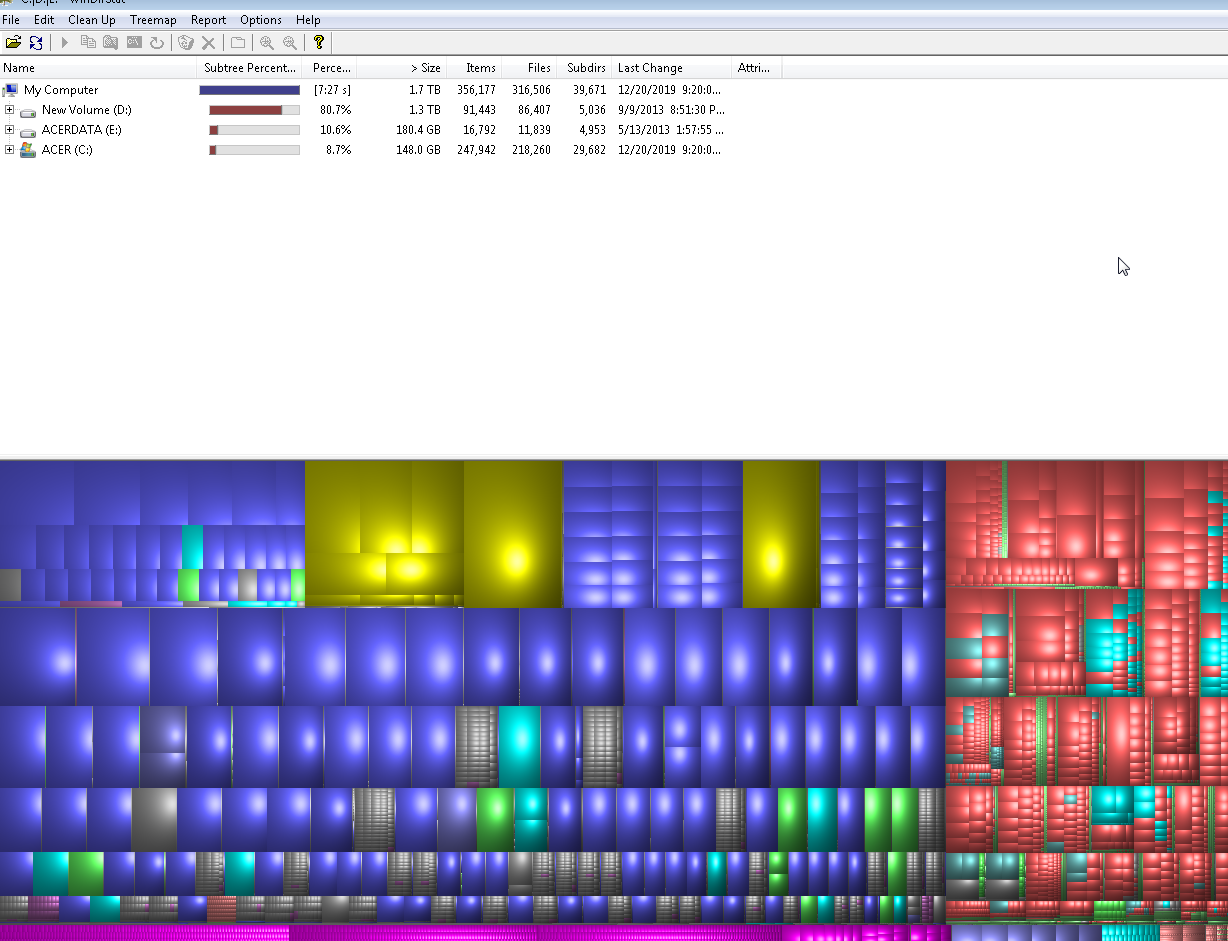
Just found an open-source utility that maps out disk usage: WinDirStat <http://windirstat.info>

You let it run and it shows an overview of all of your disk usage. It also lets you delete selected files -- nice!
The largest rectangles in the drive map are the largest files, click on one and it shows you its info and lets you manipulate it.
I have been working with laser scan point clouds recently. We fill up disk space very quickly; I think this will come in handy.

Tuesday, August 21, 2012

Beware the Disjoin


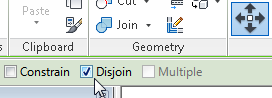
When we do a Move command in Revit, on the Option Bar there is an option for Disjoin. this option stays as it was set for every Move and even stays set from session-to-session.

When Move is done with Disjoin, it is as if we'd copied the selected element(s) and the deleted the original selection. This is sometimes very useful, especially when Revit has set up some association (especially with walls) that is affecting other elements that we don't want to move.


On the other hand, when elements are moved with Disjoin, most associated elements are deleted. This includes dimensions, tags, keynotes, etc. "Based" families are also deleted, with the exception of Wall-based Doors & Windows (there may be others). One will get this warning if something is about to be deleted because of the Move:


Be aware and do not blithely select OK. "Can be ignored" -- yeah, if you don't mind perhaps destroying thousands of dollars of work.

Most importantly, never move a Level with Disjoin without really thinking about the implications. The views and anything else associated with that Level will also be deleted. That could be really bad. Also in a worksharing situation, there may be no Undo after that's happened. If you find yourself in that situation, consider not Synchronizing, discarding your session, and making a new Local.

Here is the "Advanced Sample Project" before, and after, moving "01 - Entry Level" with Disjoin on:


So, when doing Move in Revit, I suggest always looking up on the screen and checking the status of the Disjoin option.